Gate Pass Format For Goods Sample Free Download
Need a Gate Pass? Sample gate pass format for factories, production units, textile mills, offices, schools, organizations, and companies is available for free download in Excel, pdf, and Word formats. Gate Pass is a compulsory document for companies, factories, and offices to bring goods in and take goods out of the premises.
Need more than a sample? Use our Gate Pass Generator to create out passes, return passes, visitor passes, vehicle passes and goods passes with your own company name, logo, print and PDF options.
Five gate pass templates available and can be used within the factory, company, school, or office as internal gate passes, outside to move goods/items, and transport gate passes for vehicles.
Some well-known gate pass terms are inward gate pass and outward gate pass, which are normally used in production units and warehouses. Please let us know if you need a new one in the comments form.
Sample 1: Material Gate Pass Format
Gate Pass Slip
Company Name: _________________
Date: [DD/MM/YYYY]
Gate Pass No: [_____________]
Issued To: [________________]
Department: _______ Designation: _________
| Description | Quantity | Remarks |
|---|---|---|
| [Item Name] | [Qty] | [Remarks] |
| [Item Name] | [Qty] | [Remarks] |
Authorized By:
Name: ______________ Signature: ______________
Security Check:
Name: _________________ Signature: ______________
Remarks: ________________________________________
Company Stamp: ______________ (if applicable)
Sample 2: Material Gate Pass Format
We are adding a New Format of Gate pass for ERP Sofware of the Company.
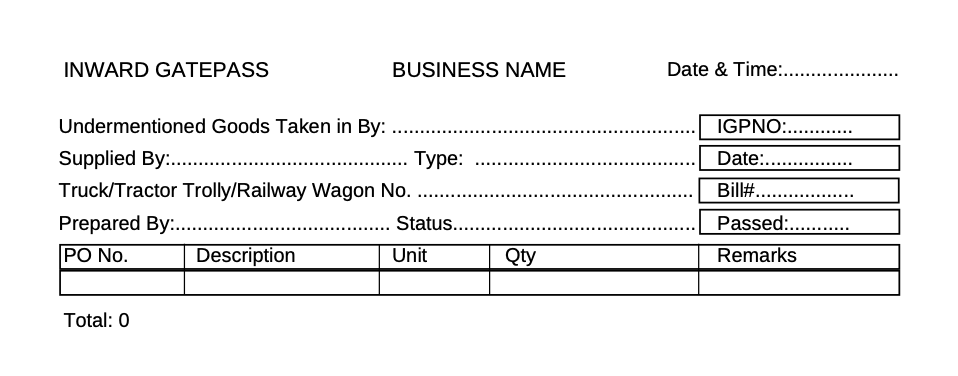
Download the Gate Formats from the Below Links:
Gate Pass Format in PDF for Free Download
Inward, Outward Gate Pass Format for Companies, ERP, etc in MS Excel File
Gate Pass Format in MS Word Free Download
Sample 3: Gate Pass Format for Incoming & Outgoing Items
Internal Gate Pass
Company Name & Logo
Sr.# _______
Mr/Ms. _______________ E.Code: ______ Deptt: _______ Date: _________
Allowed to take the following items/articles Out/In Form: ______ To: ______
| Sr.# | Item Code | Description | Unit | Quantity | Remarks |
| 1 | |||||
| 2 | |||||
| 3 | |||||
| 4 | |||||
| 5 | |||||
| 6 |
Note: This gate pass used only for internal purposes
| Prepared By Received By Head of Department |
Pass IN/OUT Security Incharge |
Sample 3: Gate Pass for Vehicles with Meter Reading
Company Name & Logo
Traveling/Transport Gate Pass
Date: ____________
| Name: __________ Department: __________ Places to Go:___________ Druation(Aprox): _____________ Signature: _______________ |
| Vehical No: _____________ Driver: ____________ Senior Manager Admin: __________ |
| Meter Reading at Departure: __________ Time Out: ____________ Meter Reading at Teturn: ____________ Time In: ____________ Distance Covered: ____________ Sign Driver: ____________ |
Sample 4: Gate pass Sample for Employees to Brings Items in and take out
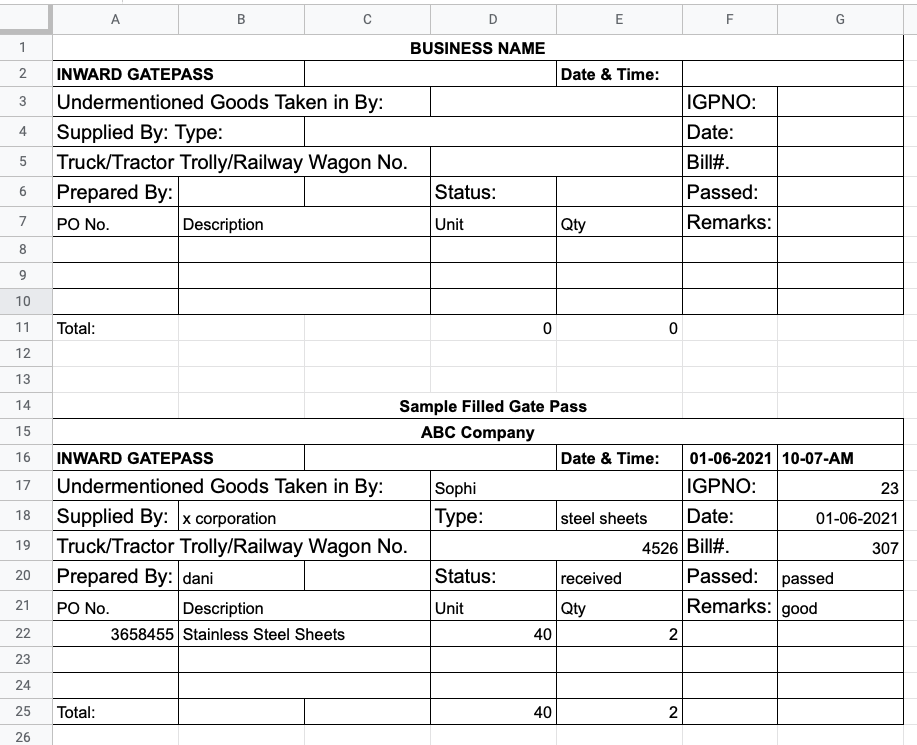
Gate Pass for Regular Items
Internal Gate Pass Free Download
Transport Gate Pass Free Download
Sample 4: Gatepass Format for Goods
[Your Company/Institution Name] [Address] [City, State, ZIP Code] [Phone Number] [Email Address] [Website (if applicable)]
GATE PASS – GOODS
[Date: ____________]
Gate Pass No.: _______ Valid Until: [Date: _______]
To Whomsoever It May Concern,
This is to certify that the following goods have been approved for exit from our premises, subject to the conditions mentioned below:
1. Consignee Details:
- Name: _____________________
- Company/Organization (if applicable): _______________
- Address: _________________________________
- Contact Number: ___________________________
2. Description of Goods:
- Item 1: _____________________________
- Quantity: _______________
- Serial/Model Number (if applicable): _______________
- Item 2: ________________________________
- Quantity: _______________
- Serial/Model Number (if applicable): _________________
[Add more items if necessary]
3. Purpose of Exit: [Specify the reason for the goods’ exit, e.g., shipment, repair, exhibition, etc.]
4. Date and Time of Exit:
- Date: ________________
- Time: ________________
5. Authorized Personnel:
- Name: _________________________
- Designation: ______________________
- Signature: _______________________
6. Conditions:
- The gate pass is non-transferable and valid only for the specified consignee and purpose.
- The goods must be accompanied by this gate pass throughout the exit process.
- Any damages or discrepancies in the goods’ quantity or condition must be reported immediately.
- The goods must be returned to our premises by the specified “Valid Until” date if not permanently removed.
- Our company reserves the right to inspect the goods upon their return.
- The gate pass is subject to cancellation or revocation at our discretion.
7. Additional Notes (if any): [Include any specific instructions or notes relevant to this gate pass]
By signing below, the consignee acknowledges receipt of the goods and agrees to comply with the conditions mentioned above.
Consignee Signature: ___________ Date: ___________
Authorized Personnel Signature: __________ Date: __________
Issuing Authority Signature: ___________ Date: ___________
Note: This gate pass is a legal document. Unauthorized duplication, alteration, or misuse is strictly prohibited, and offenders may be subject to legal actions.
Thank you for your cooperation.
Sincerely,
[Your Name] [Designation] [Your Company/Institution Name]
Share with Friends


