Quotation Format in Corel Draw, and PDF Files
Quotation Format in Corel Draw, and PDF Files for your office. This quotation can be used for multi-purposes within, and outside the companies. This quotation is very good for shops, small business, and after sales services.
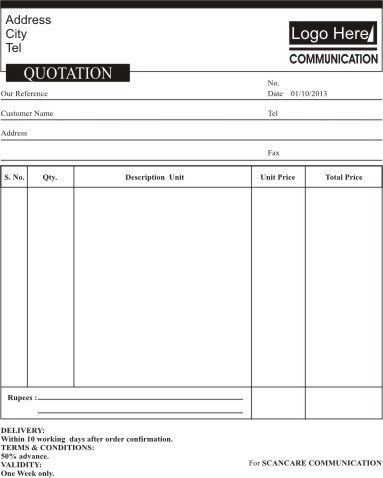
Sample quotation includes company logo, company name, address, and telephone, numbers of the vendor, and all the customer information like customer name, address, company, and telephone numbers.
In the main section it includes columns for serial number, quantity of the product/items, description of the products/items, unit price, and than total price.
In the end it also includes terms, and conditions of the issued quotation like validity, and order processing time, payment schedule, tax information, and the authorized signatures of issuing party.
Quotation Format Samples
Download Links:
- Quotation Format in PDF File
- Quotation Format in Corel Draw 11
Using this business document effectively
This resource can be adapted for quotation Format in Corel Draw, and PDF Files. Start with the supplied structure, then replace sample fields and wording with accurate information from your organization, project, transaction, or record. The finished document should be easy to verify and consistent with your internal procedures.
Details to review
- Use clear headings and retain only the sections required for your purpose.
- Check names, dates, totals, reference numbers, approval fields, and contact details carefully.
- Use the file format requested by the recipient and test calculations or editable fields before distribution.
- Save an original copy and a final dated copy for your records.
Review the document for completeness, readability, and confidentiality before sharing it. Requirements vary by organization and jurisdiction, so use any official form or mandatory wording provided by the relevant authority.
Share with Friends


